Automation
Google Gemini Now Automates Multi-Step Mac Tasks in Background
The AI assistant can navigate files, apps and websites while users work elsewhere, with approval controls for key actions.
Key takeaways
- Google Gemini's Mac app now automates multi-step tasks across local files, desktop apps and websites in a separate background window.
- Users control which apps Gemini can access, can pause execution at any time, and must approve key actions before they proceed.
- Proposed use cases include extracting data from PDFs to fill shipping forms, assembling presentation decks from multiple dashboards, and staging resale listings from photos.
- The feature is currently limited to English-language users in the United States through the Gemini Mac app.
- Google's examples describe intended workflows rather than independently verified performance demonstrations.
Google Gemini gains computer-use automation on Mac
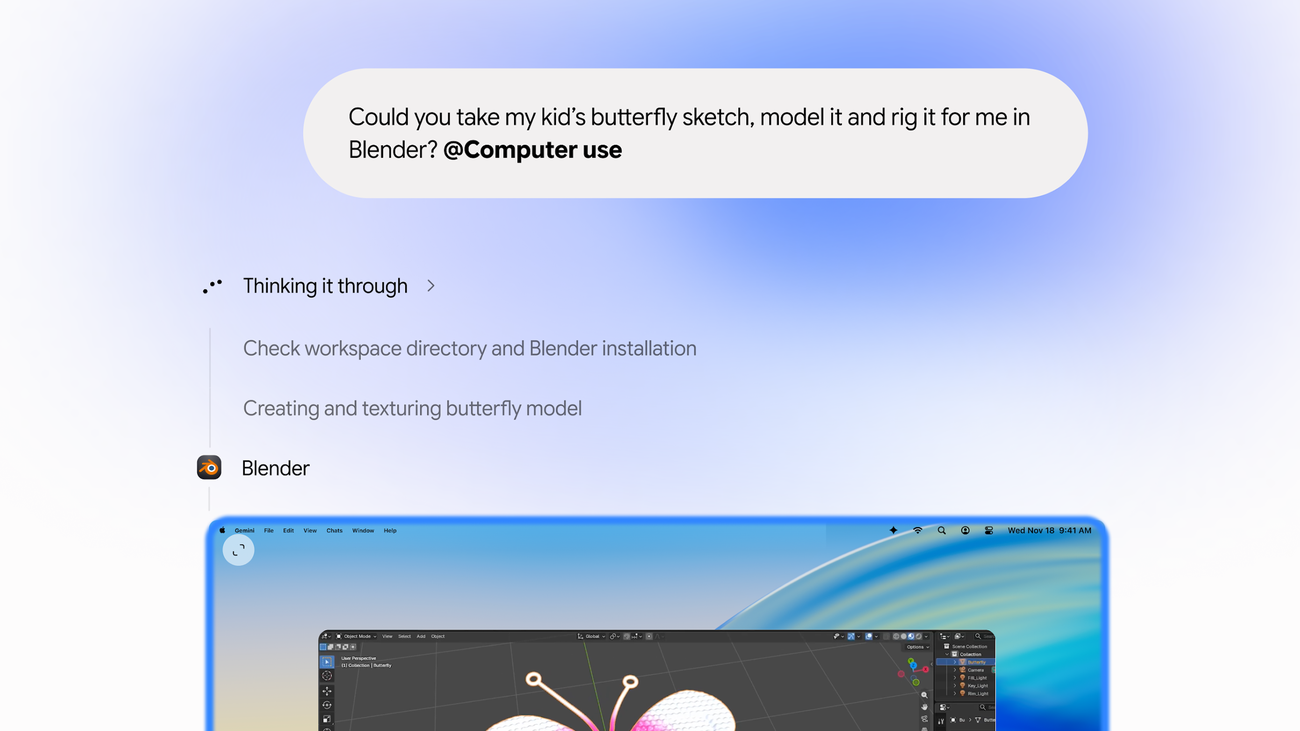
Google has introduced computer-use capabilities to its Gemini Mac app, enabling the AI assistant to execute multi-step tasks across local files, desktop applications and websites while running in a separate background window. The feature, announced November 19, 2024, represents a shift from providing instructions to directly handling interface interactions.
According to Google, users describe a task and Gemini navigates menus, fills forms, enters data and clicks through workflows without commandeering the main screen. A live preview appears in the chat interface while the automation runs separately.
Example workflows span document handling to creative production
Google outlined several intended use cases, though these represent the company's vision for the feature rather than independently verified performance benchmarks.
For shipping quotes, Gemini can extract weights, dimensions and addresses from PDF documents stored on the Mac, then populate multi-field forms on shipping websites. In presentation preparation, the assistant can gather metrics and screenshots from dashboards across different regions and compile them into Google Slides.
Other proposed workflows include analyzing clothing photos in local folders, researching resale prices and staging listings on marketplace platforms—though Google stops short of claiming Gemini will complete transactions. The company also suggests batch color-grading photos in design software or configuring complex 3D scenes.
User controls limit autonomous execution
Google has built several safeguards into the automation system. Users select which applications Gemini can access before tasks begin. They can monitor each step in real time through the preview window and pause execution at any point. Key actions require explicit user approval before proceeding.
This control framework addresses a fundamental tension in computer-use AI: granting sufficient access to complete useful work while maintaining oversight of potentially consequential actions.
Why it matters
Computer-use automation represents AI's expansion from generating text and images to directly manipulating software interfaces. For businesses, this capability could accelerate routine data-entry tasks, cross-platform reporting and multi-step administrative workflows. The background execution model—keeping the user's main workspace available—distinguishes Google's approach from screen-takeover implementations. However, the requirement for approval on key actions suggests Google recognizes reliability limits. Organizations evaluating this technology will need to weigh time savings against the overhead of monitoring and approving automated steps, particularly as accuracy in real-world conditions remains unproven.
Limited initial rollout
The feature is currently available only in English within the United States through the Gemini Mac app. Users can access the app at gemini.google/mac, according to Google's download instructions.
The rollout's geographic and language restrictions indicate Google is taking a measured approach to deploying computer-use automation, likely gathering performance data and user feedback before broader expansion.
Details of the feature were first reported by Automation Watch.