SageMaker AI Studio adds no-code UI for inference optimization
New visual interface guides teams through model deployment configuration without requiring deep infrastructure expertise or API knowledge.
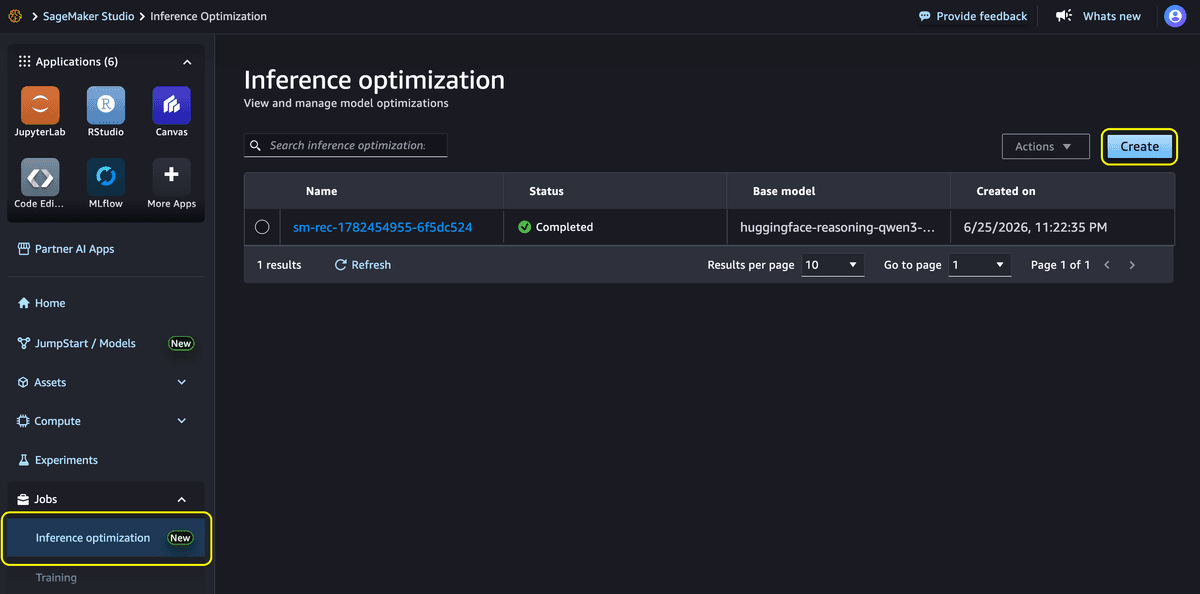
Amazon SageMaker AI Studio now offers a visual, no-code interface for optimizing generative AI model deployments, removing a significant barrier for teams without deep infrastructure expertise.
The new UI builds on inference recommendation capabilities that AWS launched via API in April 2025. While the programmatic interface delivered data-driven configuration recommendations, it assumed users understood which parameters to set and how to interpret raw benchmark output. The Studio interface eliminates that assumption through guided workflows, preset use-case profiles, and visual performance comparisons.
Why it matters
Deploying generative AI models to production typically requires lengthy cycles of manual benchmarking and optimization to find the right combination of instance type, serving container, and optimization strategy. This new interface compresses that process from days to minutes for common workloads, democratizing access to production-ready configurations across technical and business teams. Machine learning engineers can validate deployments while technical leaders evaluate cost-performance trade-offs—all without writing code.
How the workflow operates
Users begin by selecting a preset use-case profile that matches their traffic pattern. The "Interact" profile models chat-style workloads with short inputs and moderate outputs. "Generate" targets content generation with longer outputs, while "Summarize" optimizes for document summarization's high input-to-output ratios. Teams with unique requirements can choose "Custom" to specify their own datasets, concurrency levels, and token lengths.
Next, users select an optimization goal. "Minimize latency" tunes for the lowest response time, suitable for interactive applications. "Maximize throughput" serves the highest tokens per second for batch workloads. "Minimize cost" identifies the most cost-efficient configuration for expected traffic patterns.
The interface supports multiple model sources: foundation models from the SageMaker JumpStart catalog, custom artifacts stored in Amazon S3, registered packages from Model Registry, or existing SageMaker models from previous deployments.
Benchmarking and deployment
Behind the scenes, SageMaker AI analyzes model architecture and memory requirements to identify viable configurations. It applies goal-aligned optimizations—speculative decoding for throughput or kernel tuning for latency—then benchmarks each configuration on real GPU infrastructure using NVIDIA AIPerf with multi-run confidence intervals.
Results appear as ranked inference packages showing performance metrics including time to first token, inter-token latency, throughput, and cost. Users can deploy their preferred configuration with a single click. The system registers the optimized model, configures the endpoint, and provisions infrastructure automatically.
For minimum-cost goals, SageMaker AI creates an endpoint with its recommended instance type and runs benchmark jobs. Minimum-latency optimization uses kernel fine-tuned deployments when supported, or creates standard endpoints for each instance type. Maximum-throughput optimization may first train a draft model for speculative decoding before deploying endpoints.
Best practices
AWS recommends re-running optimization jobs after model fine-tuning, when new instance types become available, when traffic patterns shift significantly, or after serving container upgrades. Regular optimization runs every few weeks capture continuous improvements from the SageMaker AI team.
The feature carries no additional cost for generating recommendations, though standard compute charges apply for optimization jobs and endpoints provisioned during benchmarking.
These details were first reported by AWS in a machine learning blog post announcing the Studio UI launch.
This is an original analysis by the Omega editorial team. Source reporting: AI Watch.
Want systems like this working for your business?
Book a Call